Asus TUF Gaming A14 Review – Is This The Best Gaming Laptop
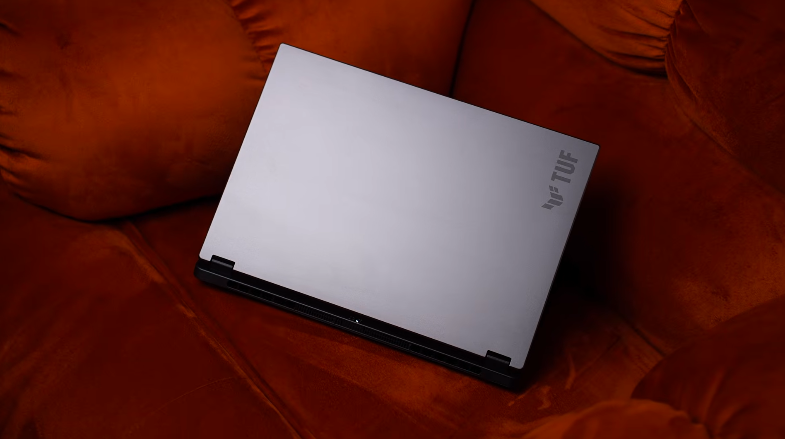
Table of Contents
Build and Design:
The top lid is made of metal. The bottom part is also made of metal. The interior is made of polycarbonate. The colour we have is Jaeger Grey. If you touch the top lid, there are no fingerprints. And the laptop is military standard 810H certified. So in this, the laptop will survive among drops, vibrations, or extreme humidity and temperatures. There are rubber pads at the bottom for better airflow. We also get air intake vents. The edges of the laptop and these corners are not that sharp. And the laptop is 16.9mm thick. The previous generation TUF A14 was also of the same thickness.
According to us, it could’ve been reduced because of the efficiency. But with this, there’s thermal management. The laptop weighs around 1.4 kg, which is usually found in thin and light laptops. And if you include the charger, it weighs around 1.9-2KG. So it’s not that heavy. If you travel a lot & you want a small & light laptop with good performance, then it targets those people. The lid can be easily opened with 1 hand. It can be opened up to 180 degrees. The weight distribution is good. The screen wobble is quite minor. The top lid flex is also not that much. The keyboard flex is also minor. The hinge quality is good.
Specifications:
Now talking about the technical specs, it has the latest AMD Ryzen AI Max Plus 392 processor. Which were announced during CES. It has 12 cores & 24 threads. The max boost clock is 5GHz. And the Ryzen AI lineup, Max Plus, is at the top. Everything will be below it. The one is the flagship processor. It has a 392 processor. It also has a 395 processor with 16 cores & 32 threads. We think it will be there in more expensive & flagship laptops. But the iGPU is the same. It has 32GB LPDDR5X RAM with 8000 megatransfers per second speed. And it has an AMD Radeon 8060S iGPU. It doesn’t have a dedicated GPU. You can allocate the memory of this iGPU. As we showed in ROG Ally, you can allocate the memory of the iGPU. So we get the option there. And this AI Max Plus processor runs on a unified architecture. So the amount of memory that the iGPU needs will be shared with the RAM. In the future, if there is a 16GB RAM game. So you can allocate 16GB RAM to this iGPU. And that’s why it has 32GB RAM. So that you can allocate the memory according to your tasks when you are doing CPU or GPU-intensive tasks.
Talking about the technical specs of the iGPU, It has 40 compute units and it’s clocked at 2900MHz. And it also has 40 RT cores. Even when it’s an iGPU. And it has up to 50-top NPU. Which means it’s Co-Pilot Plus certified. But if you add CPU, GPU, and NPU, then it can give a total of 122 TOPS power. Trillion operations per second. This is for AI. Talking about the storage, it’s a 1TB Gen 4 SSD. You can see its read & write speed. They are proper GEN 4 speeds, and there are 2 M.2 slots in the laptop. So you can upgrade it in the future. In connectivity, we get Wi-Fi 6E & Bluetooth version 5.3. Wi-Fi 7 & Bluetooth version 5.4. We get MS Office 2024 for a lifetime and Xbox Game Pass Premium for 3 months.
If you want to play games from day 1, you can do it. And you can also do office tasks & productivity along with that. And as this laptop is Co-Pilot Plus certified, we get live captions in it. It supports 21 languages. So if you are taking professional meetings, Or if you are talking to someone from another country, It can help you if there is a language that you don’t understand, It can help you in content consumption. You can take instant actions like copying, summarising text, visual search etc. You can also save images directly from your screen. And in Co-Pilot Plus, there are other things like background blur with photos. You can erase objects from photos. And recall feature, If you have seen something on a website, And you don’t remember what it was, You can type it & it will show you the results, according to your system usage that where have you used different things. Basically, it’s a history, but it’s a visual history and in Paint, we get the co-creator.
Performance and Benchmarks:
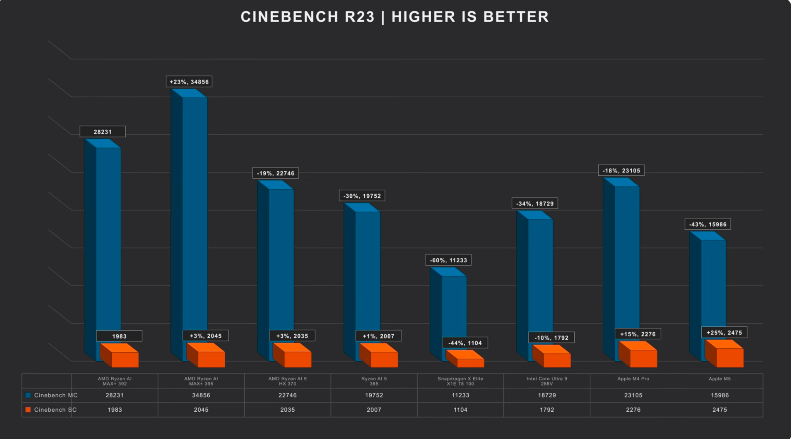
Now let’s talk about the performance & benchmark. Look at the numbers of Cinebench R23 in given image. Multicore scores are 28000+. Single-core scores are around 1900+. It performs better. And all these CPUs are with the ones with which we get an iGPU. So these are thin performance laptops. And you can see that It’s performing better than Apple M5 & M4 Pro. Even if it’s a CPU, even if you compare it with Intel Core i9-258multicore and single-core performance, it’s amazing. Here are the scores of Cinebench 2024, And these are Multicore & single core scores of Geekbench 6. If you want to do CPU-intensive tasks, Like music production, coding in which there is high-end programming & development, Then all these will work easily.
And for music production, The best part is 1TB storage. So there won’t be a shortage of storage. And people use this type of laptop a lot while travelling. So we haven’t used the charger sometimes. It can go upto turbo mode. But on battery, it only goes up to performance mode. Which means it will perform,m but you will have to plug in for peak performance. But on battery, no matter how many tasks you do whether they are productivity tasks or anything else. It has a better performance in comparison to 4060. It has a better performance in comparison to 5050. Then we thought to compare it with Geekbench 5060 or 5070. They will obviously perform better as they are dedicated GPUs. And Intel says that Intel Arc iGPU are very strong, But even that is not able to stand next to it. So iGPU is amazing in terms of AI. Prompt is available on the screen. The output of 8 billion parameter model came in around 36 seconds. But it struggled in 32 billion parameter model. It took 6 minutes 45 seconds. But it didn’t crash, and the output still came. Deep Seek R1 is a heavily trained model. A lot of thinking happens in it.
If you are running AI models locally on your device, the performance can vary. It is a capable device. It doesn’t mean that it doesn’t have a GPU so it won’t be able to run anything. Even though it is light, it performs really well. If you are a data science student, Then you need a good CPU-GPU combination. This laptop gives easily. So your data science tasks will be done easily. But if you are running large-scale deep learning, transformer models, and training on large data sets, Then we will recommend a gaming laptop with 5070 or above. It will be heavy.
Battery:
The battery is 73Wh in this thin laptop. It can easily give you a backup of 11-12 hours. An x86 architecture laptop. With this much performance. Means, Only when want to get performance, In basic tasks like travelling, meeting, etc. It is a strong backup. Rest, the backup can vary in your usage too. Rest, if you reduce the resolution, Brightness And if you are using earphones, If it is connected to Wi-Fi, a lot of things vary. You can get a backup of 1-1.5 hours. Even for gaming. Windows laptops are beneficial here. And the 200W charger supports fast charging. In 24 minutes, it charges up to 50%. But to go up to 100% it took 1 hour 39 minutes. So, the charging speeds are also good.
Ports:
If we talk about ports on the right side, There is a USB 3.2 Gen 2 Type A port. There is a USB 3.2 Gen 2 Type C port. In which there is a DP 2.1 support. There is a 4K 240Hz output. There is no PD support in this port. There is a micro SD card slot. In which you can put up to 1TB of SD card. This SD card is also useful in storage expansion. A lot of people use it. They don’t want to install an SSD. They download small documents and keep it in it. So, they buy an SD card. Then, on the left side, There is a power input port. There is a HDMI 2.1 port. Through which we were getting 4K 240Hz output. And a USB 4 Type C port. In which we will get fast data transfer.
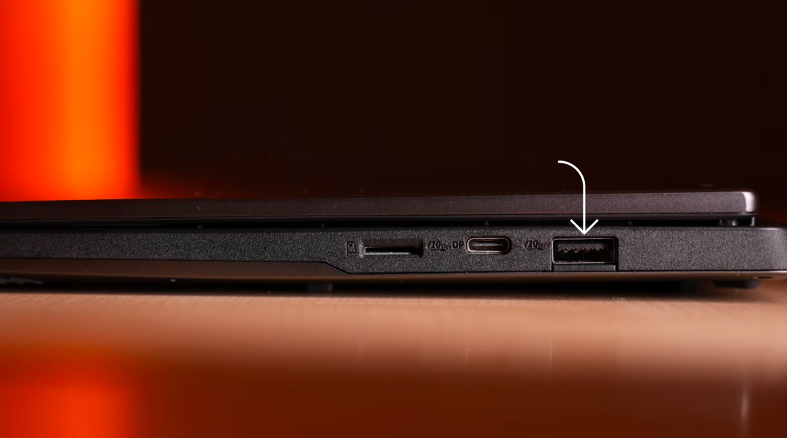
And there is a 100W power delivery support. So, you don’t have to carry a 200W charger. You don’t have to do performance tasks. Then you can use a normal 100W Type C charger. Which is used to charge the phone. You can use it to charge the laptop. And yes, we will get a display output with this up to 4K 240Hz. And the output of every port is through iGPU. Because there is no dedicated GPU. So, it’s the same AMD Radeon 8060S. And there is another USB 3.2 Gen 2 Type A port. And a headphone-mic jack combo.
Keyboard and Trackpad:
Then, there is a keyboard. This is a 14-inch laptop so, you will get a small keyboard. Typing experience is good. There is a power button here and the control buttons are separate. In which there is Armory Crate, mute, unmute. There is a key to increase or decrease the volume. And there is a big co-pilot plus key. And there is a single color backlit keyboard. There is a white light with 3 levels of adjustment. You can also turn it off. And it has 1.7mm key travel. Overall, the typing experience is good. Then, we have the trackpad. According to the 14-inch laptop, it’s good. We get a premium glass touchpad. It supports all the window gestures. And it’s good to use.
Display:
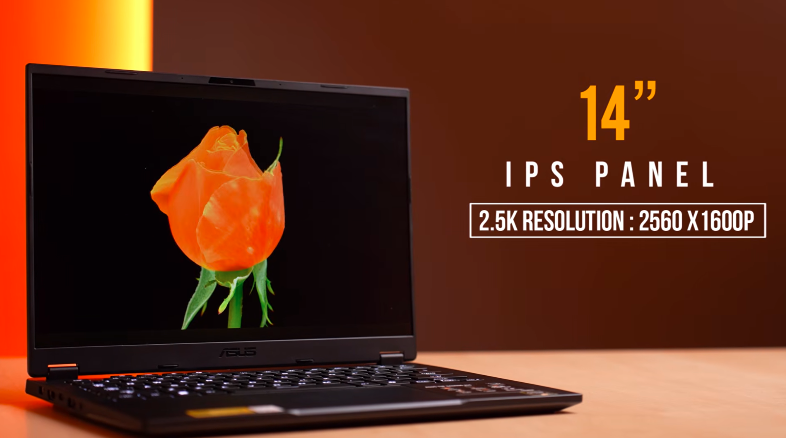
Then, coming on to the display. It has a 14-inch IPS display. It has a 2.5K resolution. 2560×1600. It has 16:10 aspect ratio. Yes, obviously, it has an anti-glare panel. It has a 165Hz refresh rate. And it also supports FreeSync Premium. For variable refresh rate. It doesn’t support HDR. According to the premium range of this laptop, HDR should have been there. Then, the brightness push would have been more. And if we talk about the display experience. The color accuracy is good. If you want to do color grading tasks in photos and videos, Then they can be done. If you watch Multimedia. It doesn’t disappoint in any environment. Overall, the display is good. Even the bezels are thin, If you look at the left and right or even top bezels, They are thin. So, the experience of the display is good.
Speakers:
If we talk about the speakers the brand didn’t mention about the wattage. But the sound of the speakers. It has a fulfilling, thumpy sound, the speakers don’t disappoint. It has a down-firing speaker. So, you will get a good sound on a flat surface. It also has Dolby Atmos support. So, you can enjoy Dolby Atmos on external device. You can connect your laptop to a big screen and enjoy movies.
Webcam and Mic:
This is its webcam. And the mic is also being used of the laptop. You can check the sample in the normal lighting condition. And this is a 1080P 30 FPS webcam. So, guess the quality. And share your opinion in the comment section. It also has Windows Studio effects. Like automatic framing, eye contact, and background effects. By the way, it has MyAsus. In this app, you get different modes of noise cancellation like RAW 360 recording, Authentic mode, Single presenter where only your voice will be heard by the other person. There are multiple things that will target professional users. And you can also set the noise cancelling on the speaker so that if there is a lot of noise coming from the other person And you just want to listen to his voice then you can do that too.
Armory Crate:
Rest, You get Armoury Crate software, We get Different operating modes, Stats, System configuration, And Memory allocation, you can do it up to 24 GB. We were also testing different allocations in gaming, 8 GB was very optimized. Rest, it can vary based on future games. So, You can tweak it accordingly And there is lighting where you can set different effects on the keyboard and do resource monitoring. And there is Armoury Crate as it is in other Asus laptops. And these days, chatbots are installed in laptops.
Conclusion:
So, this was the ASUS TUF Gaming A14 full review for 2026. If your target is only gaming and you don’t care about anything else, Then you can definitely look at the gaming laptop options. Even ASUS ROG series or TUF A16 series will be available at a cheaper price with a dedicated GPU. But obviously, you will get big and heavy laptops and they will give better performance in terms of gaming.